
Free mood tracker, habit tracker & journal app in one place

A free digital journal and wellness app: log your mood, build daily habits, manage your to-do list, plan weekly goals and see the patterns between your sleep, focus and mental health on clear charts.

Tired of switching between a mood diary, habit tracker, daily planner and to-do list app? Balance Journal is a free productivity and wellbeing app that brings everything together so you can reflect, plan and act in one seamless flow.


100% Free
No credit card needed
Private
Your data stays yours
PWA
Phone, tablet & desktop
JSON export
Your data, ready for any AI
All-in-one
Journal, planner & tracker

How Balance Journal works

Three simple steps to better self-awareness, mental clarity and daily balance.

Capture

Log your mood, write journal notes, check off habits and record health metrics in under two minutes.

Review

See trends, streaks and correlations between mood, habits and metrics on clear charts. Export any period as JSON and reflect on it with the AI assistant of your choice.

Improve

Turn insights into clear weekly goals and focused actions that build real momentum.

Features and real-life benefits

A free wellness and productivity app designed to help you live with more clarity, mindfulness and steady progress.

Daily mood journaling

Understand your emotions and their triggers. Notice signs of stress early and respond before energy drops — building awareness that supports emotional balance.

Custom health metrics

Track sleep, heart rate, steps and focus. See how your body responds to daily choices — discover what supports recovery, calm energy and deep work.

Task lists & habit tracking

Checking off recurring habits and daily tasks creates real momentum. Visible daily progress brings focus, calm and a sense of control.

Goal ladder

From long-term vision to weekly actions — connect daily efforts to something meaningful. Stay consistent and watch real progress build up over time.

JSON export for AI reflection

Export any date range as structured JSON and paste it into ChatGPT, Claude or your favorite AI assistant. Your entries never leave the app on their own; you decide when and where to reflect.

Public profiles (optional)

Boost motivation through gentle accountability. Share selected progress publicly, inspire others and strengthen your own commitment to growth.

Charts & data visualization

Visualize mood, sleep, focus and any custom metric as interactive line charts. Spot trends, compare time periods and see how your wellbeing changes over weeks and months.

Statistics & completion tracking

See your task and habit completion rates on a weekly heatmap. Track consistency across 30 days or all time — a simple way to stay accountable to your daily planner.

Daily reminder emails

Get a gentle nudge at your preferred time to update your journal. Set your timezone and reminder hour — never miss a day in your mood diary.

Key features of Balance Journal

All-in-one self-care and productivity app — mood tracking, habit tracker, custom health metrics, goal planner, task management, data visualization, public profiles and JSON export for reflection with any AI assistant.

Mood Journal & Custom Metrics

Capture your day in one calm, structured flow — from how you feel to how your body responds. Record your mood and journal entry alongside custom measurements such as sleep duration, heart rate, steps, focus or anything else you want to track.

Over time, small observations build self-awareness — helping you see what supports your energy, balance and focus.

  • ✓One daily flow: mood, notes and metrics together in under two minutes.
  • ✓Fully customizable: create metrics that match your life — sleep, HR, caffeine, creativity.
  • ✓Spot patterns: understand how rest, activity and thoughts interact.

Task Management & Habit Tracking

Build recurring habits that appear daily, weekly or on specific days — like "morning meditation" or "weekly review." Add one-time tasks with due dates for deadlines. Organize everything into color-coded projects.

A visual progress bar shows how your day is going. Checking things off reduces mental clutter and builds momentum.

  • ✓Recurring tasks: daily, weekly or custom schedule — they just appear when needed.
  • ✓Projects: color-coded groups for Health, Work, Growth or anything else.
  • ✓Daily progress: see at a glance how much you’ve accomplished today.

Goal Ladder — Vision to Weekly Actions

Define long-term goals and break them into yearly, monthly and weekly milestones. Each level connects naturally with your journal and daily tasks, so goals stay alive in everyday actions.

Instead of feeling overwhelmed, you see exactly what matters right now — and how every small step contributes to something meaningful.

  • ✓Hierarchical structure: long-term → yearly → monthly → weekly goals linked together.
  • ✓Progress tracking: visual progress bars at every level.
  • ✓Journal integration: weekly goals connect to your daily entries and reflections.

Insights & JSON Export for AI Reflection

The Insights tab shows your habits as a completion grid, your current streak and trend charts for mood and every numeric metric over 30 or 90 days, so you can see what supports your energy and what drains it.

Want a deeper reflection? Export any date range as structured JSON (journal entries, mood, metrics, tasks and goals) from Settings and paste it into ChatGPT, Claude or any AI assistant you trust. Balance Journal never sends your entries to an AI provider by itself.

  • ✓Habit grid and streak: see consistency day by day.
  • ✓Trend charts: mood and numeric metrics over time.
  • ✓JSON export: pick the sections and the date range, copy or download.
  • ✓Your AI, your choice: reflect with the assistant you already use, on your terms.
Create free account

Public profile & gentle accountability

Your journal, goals and metrics are private by default — only you can see them. When you’re ready, enable an optional public profile to share selected goals, streaks and weekly metrics.
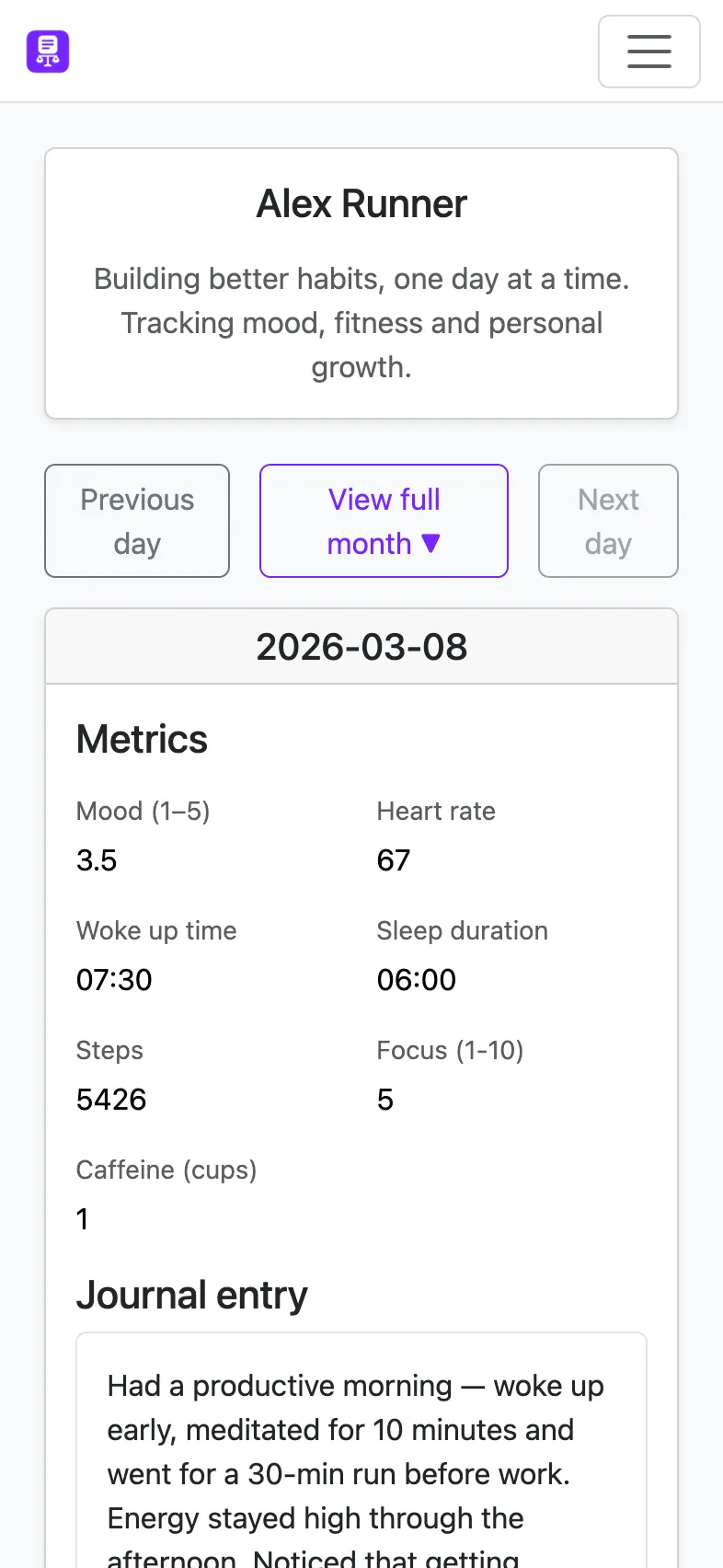
  • ✓Private by default: nothing is shared unless you choose to.
  • ✓Selective sharing: publish only the goals, streaks or metrics you’re comfortable with.
  • ✓Quiet accountability: real progress stories, not filtered highlight reels.
See a live example →
Example public profile — journal streak, shared goals progress and weekly metrics

Frequently Asked Questions

Answers to the most common questions about Balance Journal.

Are my data private and secure?
Absolutely. Your journal is private by default. Only you can see your entries, and sharing progress is always optional. We never sell or share your personal data.
What features does the app include?
Balance Journal combines:
  • Mood journaling with daily and weekly reviews
  • Goal tracker — from long-term vision to weekly actions
  • Task management with recurring habits and projects
  • Custom metrics — sleep, heart rate, steps, focus and more
  • Insights with habit grids and trend charts, plus JSON export to reflect with any AI assistant
  • Optional public profiles for gentle accountability
Can I use AI with Balance Journal?
Yes, on your terms. Balance Journal does not send your entries to any AI provider. Instead, go to Settings, pick a date range and the sections you want (journal, mood, metrics, tasks, goals) and export them as structured JSON. Paste that into ChatGPT, Claude or any assistant you trust and ask for a reflection, patterns or recommendations.
Can I export my data?
Yes. You will be able to export your notes, goals and metrics to CSV or PDF, so your data is always yours.
Does Balance Journal integrate with wearables?
Soon! Our roadmap includes integrations with Garmin, Apple Health and Google Fit to sync sleep, activity and heart rate automatically.
Does it work on mobile?
Yes. Balance Journal is a Progressive Web App (PWA) that works on any device — phone, tablet or desktop. Add it to your home screen for a native app experience, no app store needed.
How does mood tracking work?
Each day you rate your mood on a simple scale and optionally write a journal entry. You can also log custom health metrics like sleep duration, heart rate, steps and focus level. Over time, the Insights tab reveals trends and correlations between your mood, habits and health data.
Can I use Balance Journal as a habit tracker?
Yes. Create recurring tasks that appear daily, weekly or on specific days — like morning meditation, exercise or reading. Organize them into color-coded projects and track your daily completion rate with a visual progress bar. The statistics page shows weekly completion history so you can see your consistency at a glance.
Does Balance Journal have charts and data visualization?
Yes. The Charts page lets you visualize any combination of your metrics — mood, sleep, heart rate, steps, focus and more — as interactive line charts. Choose a date range, select which metrics to display and see trends over time. You can also export your data as structured JSON from Settings to use with external AI assistants or analysis tools.
Can I use it as a gratitude journal or digital diary?
Absolutely. The daily journal entry is a free-form text field — use it as a gratitude journal, digital diary, reflection log or anything else. Pair it with a mood score and custom metrics to build a complete picture of your day. Many users also use the Daily Read tab to set a daily intention or mindfulness prompt.
Does Balance Journal send daily reminders?
Yes. You can enable a daily reminder email in Settings. Choose your preferred time and timezone — you'll get a gentle nudge to update your mood diary every day, so you never break your journaling streak.